Article Summary:
- QuickBooks is a cloud-based accounting software that helps businesses manage bookkeeping, invoicing, payroll, reporting, and inventory from one platform.
- Automated transaction tracking reduces manual bookkeeping tasks and improves financial accuracy.
- Invoicing and billing features help businesses streamline payments and maintain healthy cash flow.
- QuickBooks payroll tools simplify employee payments, tax calculations, and compliance management.
- Real-time financial reports provide valuable insights into profitability, cash flow, and overall business performance.
- Inventory management features help product-based businesses track stock levels and avoid inventory shortages.
- With proper setup and expert support, QuickBooks can improve efficiency, reduce accounting errors, and support business growth.
Running a small business means making dozens of financial decisions every week. Invoicing clients, tracking expenses, paying employees, and understanding whether the business is profitable often happen at the same time. This is where accounting software stops being optional and starts becoming essential.
QuickBooks Accounting Software is one of the most widely used tools for small business accounting. It promises to simplify bookkeeping, reduce manual work, and give business owners clarity over their finances. But what does QuickBooks do, and which functions matter the most in real-world business operations?
This article breaks down the five most useful QuickBooks functions, explains how they help small businesses, and shows where professional support can unlock even more value.
This guide walks through the five most useful functions of QuickBooks. Each one supports clean numbers, smooth bookkeeping, and better financial control.
What is QuickBooks Accounting Software?
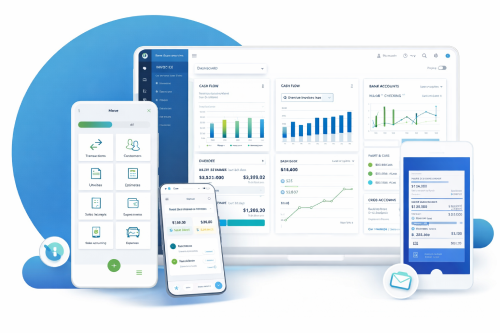
QuickBooks is an accounting and bookkeeping platform developed to help businesses manage their day-to-day financial activities. It is available as cloud-based software, allowing business owners, accountants, and finance teams to access data securely from anywhere.
At its core, QuickBooks centralizes financial data. Instead of using spreadsheets, separate payroll tools, and disconnected banking apps, businesses can manage everything in one place. This reduces errors, saves time, and makes financial reporting far more reliable.
What Does QuickBooks Do?
QuickBooks helps businesses manage accounting and financial operations from a single platform. It can automatically track income and expenses, create invoices, process payroll, generate financial reports, reconcile bank accounts, and monitor inventory. These features help business owners save time, reduce manual work, and maintain accurate financial records.
Key QuickBooks Functions at a Glance:
| QuickBooks Function |
What It Helps With |
Business Benefit |
| Transaction Tracking |
Automatically records income and expenses |
Accurate, real-time bookkeeping |
| Invoicing & Billing |
Creates and sends professional invoices |
Faster payments and improved cash flow |
| Payroll Management |
Calculates wages, taxes, and deductions |
Reduced payroll errors and compliance risk |
| Financial Reporting |
Generates P&L, balance sheet, cash flow reports |
Clear business performance insights |
| Inventory Management |
Tracks stock levels and reorder points |
Avoids shortages and overstocking |
Understanding 5 Useful Functions of QuickBooks
1. How Does QuickBooks Track Income and Expenses?
One of the most valuable functions of QuickBooks is automated transaction tracking. The software connects directly to business bank accounts and credit cards, importing transactions daily.
Each transaction can be categorized, reviewed, and reconciled. This ensures that income and expenses are recorded accurately and consistently throughout the month.
For small businesses, this function eliminates the need for manual data entry and reduces the risk of missed or duplicated transactions. Clean transaction tracking also forms the foundation for accurate reporting and tax preparation
Example: A business records a sale. The system updates income tables. If the same business logs an expense, QuickBooks bookkeeping displays the change instantly. This simple workflow helps owners understand spending and revenue trends.
2. How QuickBooks Simplifies Invoicing and Billing?
QuickBooks allows businesses to create professional invoices within minutes. Users can customize invoice templates, add payment terms, and automate recurring invoices for regular clients.
Payment reminders help reduce late payments, while integrated payment options allow customers to pay online. This shortens the payment cycle and improves cash flow without additional follow-up work.
For service-based businesses, this invoicing function alone can save several hours every month.
|
Type of Invoice
|
Purpose
|
Useful For
|
|
Standard Invoice
|
Regular billing
|
Service businesses
|
|
Recurring Invoice
|
Repeats automatically
|
Subscription models
|
|
Progress Invoice
|
Tracks parts of a
project
|
Contractors and
agencies
|
Note: QuickBooks also helps and provides support to users who wish to take guidance with invoice customization or delivery tracking.
3. How Does QuickBooks Handle Payroll and Taxes?
Payroll is one of the most sensitive areas of small business accounting. QuickBooks payroll features help calculate wages, deductions, and applicable taxes based on employee data.
The system keeps payroll data linked to employee profiles. It also helps with tax forms, pay slips, and compliance tasks. For firms without a dedicated accounts team, this tool saves significant time.
Benefits for the Business:
- Automated calculations
- Direct bank deposits
- Clear payroll reporting
- Tax form assistance
- Simple link to accounting software for small business
Companies also use this tool for attendance tracking and shift calculations. Payroll updates flow into your books instantly. This means your general ledger accounting stays accurate.
4. How QuickBooks Generates Financial Reports?
Reports show the health of your business. QuickBooks can produce many types of reports. These include balance sheets, profit and loss accounts, cash flow statements, and ageing reports for accounts receivable.
The software automatically generates key financial reports such as profit and loss statements, balance sheets, and cash flow reports. These reports update in real time as transactions are recorded. Business owners no longer need to wait until the end of the month to understand financial performance.
Common Reports you can generate
- Sales summary
- Vendor expense summary
- Cash flow overview
- Inventory status
- Project cost reports
Key Reports and their use:
| Report |
Purpose |
| Balance Sheet |
Shows assets and liabilities |
| Profit and Loss |
Shows revenue and expenses |
| Cash Flow |
Tracks inflow and outflow |
| Inventory Summary |
Shows stock movement |
These reports help owners plan budgets and prepare for tax season. They also support external audits. Data from Intuit QuickBooks can be exported for advisors or for Global FPO analysts.
5. Inventory Management in QuickBooks
For product-based businesses, inventory management is one of the most useful QuickBooks functions. The software tracks stock levels, cost of goods sold, and inventory valuation.
This helps businesses avoid stock shortages, manage cash tied up in inventory, and maintain accurate margins. While not as advanced as enterprise systems, QuickBooks inventory tools are sufficient for many small and mid-sized businesses.
Inventory tools include:
- Automatic stock updates
- Product categorisation
- Purchase order management
- Vendor tracking
- Sales channel syncing
Note: The software also displays the best-selling items. This guides your restock planning. It also supports demand forecasting. These features help owners link accounting, sales, and warehouse operations in one place.
Additional QuickBooks Features Worth Knowing
Bank Reconciliation
This feature keeps books accurate and reduces errors.
Tax Preparation
The software organizes numbers for filing and prepares tax summaries.
Integrations
QuickBooks ProAdvisor – level tools support many integrations. These include project systems, CRM tools, ecommerce platforms, and payment gateways.
Why Use QuickBooks for Businesses?
QuickBooks brings your entire business onto one platform. It supports tasks like accounting, bookkeeping, payroll, invoicing, and tax prep, all from one dashboard. The system scales as you grow, from QuickBooks Self Employed to QuickBooks Enterprise.
You also get access to trained QuickBooks ProAdvisor professionals who guide setup, cleanup, and optimization.
The result is simple: fewer errors, faster reporting, and a clearer view of your business numbers.
Choose QuickBooks to Strengthen Your Financial Systems:
QuickBooks supports daily work for busy business owners. It manages income, expenses, payroll, inventory, and reporting. Tools like QuickBooks Online, QuickBooks Payroll, and QuickBooks Payments help create a complete financial system.
Global FPO helps firms set up the right plan, understand QuickBooks pricing, and use the tools correctly. With expert support, businesses can save time, reduce errors, and maintain clean books throughout the year.
Get a Free QuickBooks Consultation with Global FPO
Global FPO helps businesses set up, manage, and optimize QuickBooks for bookkeeping, payroll, reporting, and financial management. Get expert support tailored to your business needs.
Schedule a Free Consultation
FAQs
Ques 1: What are the main functions of QuickBooks?
Ans: QuickBooks helps businesses track income and expenses, create invoices, manage payroll, generate financial reports, and monitor inventory in one platform.
Ques 2: Is QuickBooks good for small businesses?
Ans: Yes. QuickBooks is designed for small and growing businesses that need organized bookkeeping, reliable reporting, and scalable accounting tools.
Ques 3: Can QuickBooks replace a bookkeeper?
Ans: No. QuickBooks is a tool. A bookkeeper ensures data accuracy, reconciles accounts, and prepares reliable financial reports using the software.
Ques 4: Does QuickBooks handle taxes?
Ans: QuickBooks supports tax preparation by organizing financial data and generating reports, but businesses still need professional tax filing support.
Ques 5: How much does QuickBooks cost?
Ans: QuickBooks pricing varies by plan and features. Costs increase when adding payroll, advanced reporting, or multiple users.
Ques 6: Is QuickBooks cloud-based?
Ans: Yes. QuickBooks Online allows secure access from any location with an internet connection.
Ques 7: Can QuickBooks manage inventory?
Ans: Yes. QuickBooks includes inventory tracking for product-based businesses, though it may not suit complex inventory needs.
Ques 8: Who should use QuickBooks with professional support?
Ans: Businesses with growing transaction volume, payroll, or compliance requirements benefit most from pairing QuickBooks with expert accounting support.
 +61 (485) 921-100
 +1 (347) 781-5928
 +44 (7700) 170-900
 contact@globalfpo.com